 Proteside
 Tokens and scopes
Create API tokens in Settings → API, choose the right scopes and send the token in the Authorization header.
Every API call (except the OpenAPI document) requires a token. The token belongs to the organization, not to a user or a store: it's valid for every store in the organization and keeps working if the person who created it leaves the team.
Create a token
Only the organization owner can create and revoke tokens. Other roles see the message "Only the organization owner can manage tokens." instead of the list.
Open the tokens screen
In the store switcher, choose a store from the organization that will use the token. Then open Settings → API. The token is created for the selected store's organization.
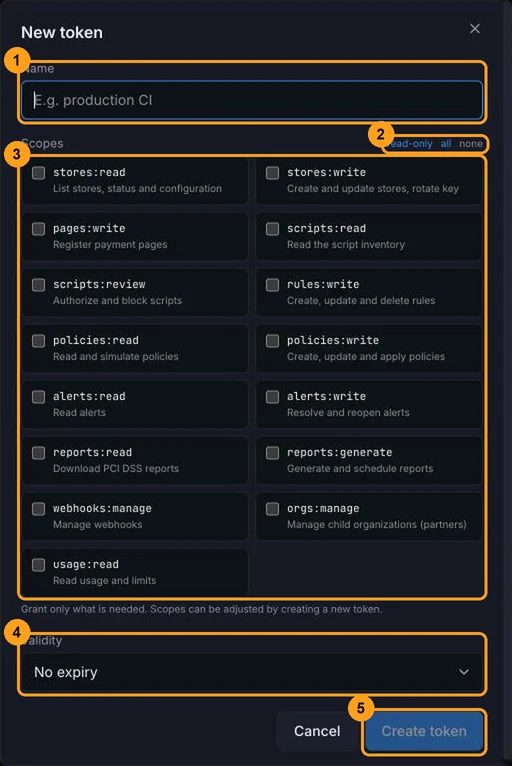
Click New token
Click New token in the top-right corner.
Give it a name
Fill in Name with something that identifies the integration, for example "production CI" or "SIEM". The name accepts up to 80 characters and appears in the list and in the audit log.
Check the scopes
Under Scopes, check only what the integration needs. The read-only, all and none shortcuts help you get started. You must check at least one. Scopes can't be changed later: to change them, create another token.
Choose the validity
Under Validity, choose No expiry, 30 days, 90 days or 365 days. After that period, the token
starts responding 401 Token expired.
Copy the token
Click Create token. In the Copy your token now window, click Copy and store the token in a secrets vault before clicking Done.
The token is shown only once
Proteside stores only a hash of the token. If you close the window without copying it, there's no way to recover it: revoke it and create another one.
Store owner isn't the same as organization owner
The screen shows the New token button to anyone who owns the selected store, but creating a token requires being the organization owner. If you see the error "Only the organization owner can manage tokens." when you click Create token, ask the organization owner to create the token.
Use the token
The token has the format ps_live_ + 24 characters + _ + 32 characters (65 in total). Send it in the
Authorization header of every request:
curl -s "https://app.proteside.com/api/v1/stores" \
  -H "Authorization: Bearer ps_live_Ab3dEf6hIj9kLm2nOp5qRs8t_..."
The first 32 characters (ps_live_ + 24) are the prefix: it's what appears in the list's Prefix column and
in the audit log entries for actions made through the API (api:ps_live_Ab3dEf6hIj9kLm2nOp5qRs8t).
When the token fails, the API responds 401 with the WWW-Authenticate: Bearer realm="proteside-api" header and one
of these messages:
message | Cause |
|---|---|
Missing or malformed bearer token | Missing header, no Bearer, or token not in the expected format |
Invalid token | Token doesn't exist or was revoked |
Token expired | Validity period has ended |
The Last used column is updated at most once per minute per token.
Scopes
Each endpoint requires exactly one scope. There's no hierarchy: stores:write doesn't include stores:read, so
an integration that creates and then reads stores needs both. Without the scope, the response is
403 insufficient_scope.
| Scope | What it grants |
|---|---|
stores:read | GET /stores, GET /stores/{id}, GET /stores/{id}/status, GET /stores/{id}/pages |
stores:write | POST /stores, PATCH /stores/{id}, DELETE /stores/{id} (suspends), POST /stores/{id}/rotate-key |
pages:write | POST /stores/{id}/pages |
scripts:read | GET /scripts and GET /rules |
scripts:review | POST /scripts/{id}/authorize, POST /scripts/{id}/block |
rules:write | POST /rules, PATCH /rules/{id}, DELETE /rules/{id}, DELETE /rules?id= |
policies:read | GET /policies, POST /policies/{id}/simulate |
policies:write | POST /policies, PATCH /policies/{id}, DELETE /policies/{id}, POST /policies/{id}/apply |
alerts:read | GET /alerts, GET /alerts/{id} |
alerts:write | PATCH /alerts/{id} (resolve and reopen) |
reports:read | GET /reports/pci, GET /reports/pci/snapshots, GET /reports/pci/snapshots/{id}, GET /reports/pci/schedule |
reports:generate | POST /reports/pci/schedule, DELETE /reports/pci/schedule; also required, together with reports:read, for GET /reports/pci?regenerate=true |
webhooks:manage | All /webhooks endpoints, including reading and testing |
orgs:manage | GET /organizations, POST /organizations and using org_id to act on a child organization (Partners) |
usage:read | GET /organizations/{id}/usage |
The read-only shortcut checks stores:read, scripts:read, policies:read, alerts:read, reports:read and
usage:read.
Listing rules requires scripts:read
The OpenAPI spec describes stores:read as the scope for reading rules, but GET /rules requires scripts:read.
If your integration lists rules, include scripts:read in the token.
A read that generates data
GET /reports/pci without period_start and period_end generates a new report on every call, even with a
read-only token. See Recipes to download reports without
generating copies.
Revoke a token
In Settings → API, click Revoke on the token's row and confirm. The effect is immediate: the next call with
that token gets 401 Invalid token. The token stays in the list with the Revoked status, for the record.
There's no API endpoint to create, list or revoke tokens: this is done only in the dashboard.
Best practices
- One token per integration. That way you can revoke one without taking down the others, and the audit log shows which system made each change.
- Least privilege. An alert collector for your SIEM only needs
alerts:read. A pipeline that only downloads reports only needsreports:read. - Keep it in a secrets vault (AWS Secrets Manager, GCP Secret Manager, Vault, protected CI variables). Never put the token in source code, on the front end or in logs.
- Rotate with overlap. Create the new token, update the integration, confirm in the Last used column that the old one is no longer being used, and only then revoke the old one. Prefer a 90- or 365-day validity to force rotation.
- Revoke at the slightest sign of a leak. The token gives access to every store in the organization.