 Proteside
 Verify the installation
Confirm in the dashboard and in the browser console that the SDK is active on your checkout.
After publishing the snippet, open your store's checkout page in a browser. Within a few seconds the SDK starts reporting. Use the three checks below to confirm everything is working.
In the dashboard
Top indicator
At the top of the dashboard (on the desktop version) there's an SDK status indicator:
- Proteside Active (green): the store has recent real traffic from the SDK.
- Proteside not detected (red): no recent real traffic.
The indicator links to Settings → Pages & Domains. There, the Detected pages section lists every page that has already sent events, grouped by domain, with the SDK active badge (activity in the last 24 hours) or Not detected.
SDK Health
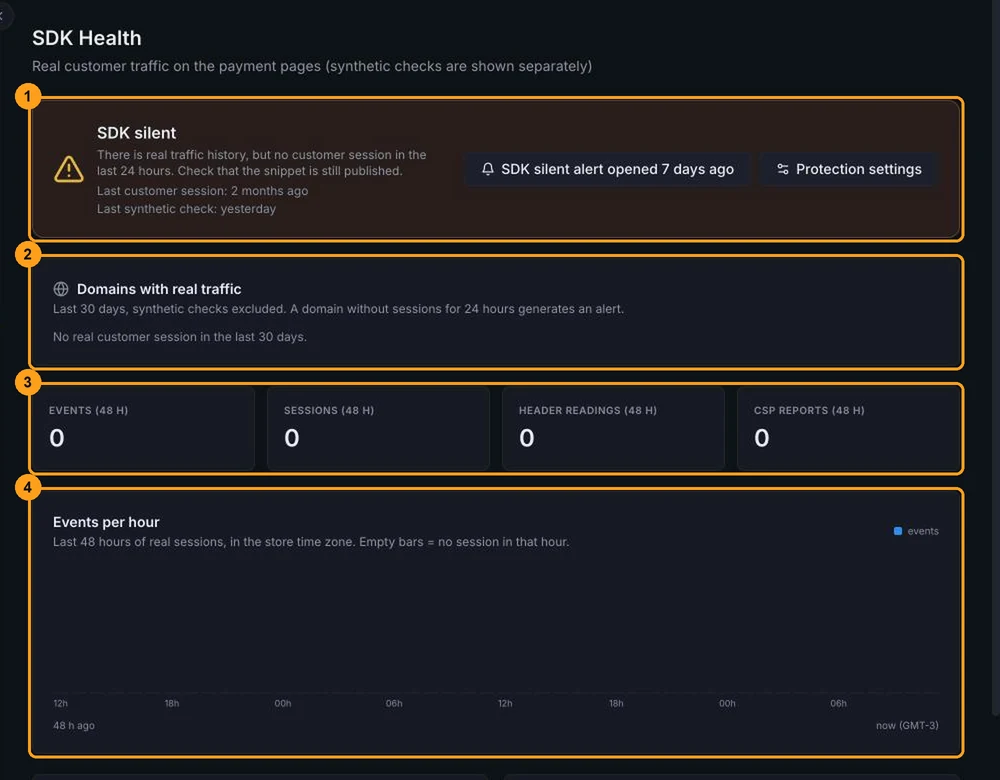
The SDK Health page shows whether the SDK is reporting real customer traffic, separate from synthetic checks.
| Status | Meaning |
|---|---|
| SDK active | Real customer sessions reported in the last 24 hours. |
| SDK not detected | No events received yet. |
| Only synthetic checks | Only Proteside's synthetic checker has sent events. No real customer has gone through the checkout with the SDK yet. |
| SDK silent | There's history, but no customer sessions in the last 24 hours. Check that the snippet is still published. |
| SDK paused (developer mode) | Developer mode is on and the SDK doesn't run any protections. |
The page also shows Domains with real traffic, the totals for the last 48 hours, the Events per hour chart, the SDK versions seen in the last 7 days and the current configuration (channel, developer mode and protection mode). Data is aggregated by hour: reload the page to refresh it.
More details in SDK Health.
In the browser
Open the checkout, open the developer tools (F12) and go to the Console tab.
SDK status
Proteside.getStatus()Expected response, a few seconds after the page loads:
{
  initialized: true,          // the SDK finished starting up
  mode: 'monitor',            // or 'block'
  paused: false,              // true = developer mode, inactive subscription or local pause
  channel: 'stable',
  calibrating: true,          // true during the first 30 s (calibration)
  activeThreats: 0,
  paymentMethodsMonitored: ['pix', 'card'],
  version: '1.1.1',
  installationOrderValid: true, // false = there's a script before the bootstrapper
  overlayCheckIntervalMs: 2000,
  rulesApplied: false,
  recipientsPinned: 1,        // number of trusted recipients received
  cardCheckoutOpen: false,
  cardCheckoutProvider: null
}| Result | What it means |
|---|---|
Proteside is not defined | shield.js didn't load. Check that the snippet is published, that your CSP allows cdn.proteside.com and that an ad blocker didn't interfere. |
initialized: false for more than a few seconds | data-key is missing, the key has an invalid format, or shield.js was loaded as type="module". |
paused: true | Developer mode is on, the subscription is inactive or the store is suspended. |
installationOrderValid: false | There's a script before the bootstrapper. See Troubleshooting. |
Bootstrapper present
The status doesn't tell you whether the bootstrapper is on the page. If only shield.js was pasted, the SDK works
with reduced coverage and installationOrderValid stays true. To check:
typeof window.__PROTE_BOOT_TS__ === 'number' // true = the bootstrapper ranNetwork requests
In the Network tab, filter by proteside:
| Request | Expected response |
|---|---|
GET cdn.proteside.com/v1/shield.js | 200 |
GET app.proteside.com/api/sdk/config?key=pk_live_… | 200 |
POST app.proteside.com/api/sdk/events | 202, a few seconds after the page loads |
A 401 on /config or /events means the key is invalid or was rotated more than 24 hours ago. In that case the SDK
keeps running with its local defaults, but no events reach the dashboard.
What to expect in the first few minutes
- First few seconds:
initialized: truein the console and the firstPOST /events. - Within 30 seconds: reload the dashboard. The top indicator switches to Proteside Active, and the page shows up in Detected pages.
- First few minutes: the page's scripts show up in Scripts with the Needs review status. Review them and authorize the legitimate ones; see Scripts.
- When a customer pays: the Payment Integrity cards move from WAITING to INTACT as each method is validated. See Payment integrity and Pix.
The SDK Health chart is aggregated by hour. A newly sent event may take a few minutes to show up there, even when the top indicator is already green.