 Proteside
 Payment integrity
See, method by method, whether what the customer sees at checkout is the payment your store generated.
The Payment Integrity page shows a card for each payment method monitored in the store: card, Pix, clipboard, cryptocurrency, boleto and others. For each one, you see whether the observed payments are intact and whether the recipient shown to the customer really belongs to your store.
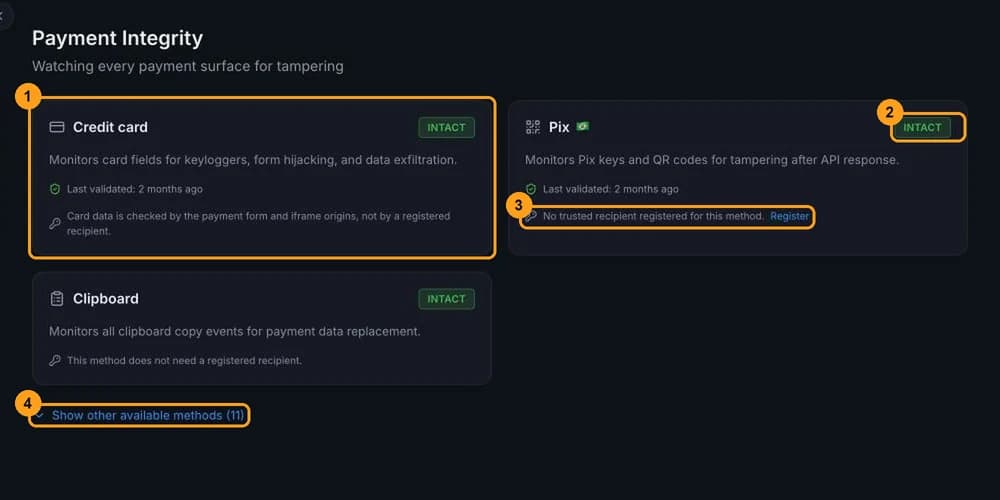
What each card shows
Each card (1) includes:
- the method's name and a description of what's monitored;
- the status (2), explained below;
- Last validated, when the last payment was checked, or "Waiting for the first transaction of this type";
- the recipient's situation (3), for methods that have a recipient (Pix, cryptocurrency, UPI and boleto).
Credit card has no recipient: the SDK checks the payment provider's form and iframes. On Clipboard and the other methods, the card says the method doesn't need a registered recipient.
Status
| Status | Meaning |
|---|---|
| NOT CONFIGURED | The store hasn't sent any SDK event yet, or the method isn't among the monitored ones. |
| WAITING | The SDK is active, but no payment of this type has been observed yet. It changes on its own when a customer pays. |
| INTACT | The last observed payment was validated and there's no open tampering alert. |
| TAMPERED | There's an open tampering alert for the method. The card turns red and shows Divergence detected. |
The alerts that make each method TAMPERED:
| Method | Alerts |
|---|---|
| Credit card | Keylogger Detected, Form Action Hijack, Iframe Replaced, Unexpected Iframe, Card Field Outside Vault, Amount Tampered |
| Pix | Pix Tampered (and Amount Tampered on Pix) |
| Cryptocurrency | Crypto Address Swap, QR Tampered |
| Boleto | Boleto Tampered |
| UPI | UPI Tampered |
| Clipboard | Clipboard Hijack |
See what each alert means in Alerts.
When a method shows as TAMPERED
Open the alert
On the red card, click View Alert →. The Alerts page opens with the alert highlighted.
Investigate
Check the Technical details to see what changed and on which page. A Pix with a recipient outside your list or a form with a changed destination point to an attack until proven otherwise: check the page's scripts in Scripts and the recent changes to the site.
Resolve the alert
After you deal with the cause, resolve the alert with a note. The method goes back to INTACT or WAITING.
Snoozing doesn't take the method out of TAMPERED
A snoozed alert stays open, and the method remains TAMPERED until you resolve the alert. The date in Divergence detected is when the most recent open alert was created, not when it last occurred.
Trusted recipients
The recipient check compares the Pix key, the crypto address, the UPI VPA or the boleto bank shown at checkout with the list of recipients that belong to your store. Without this list, a code tampered with from the first time it's shown would pass as legitimate.
The card shows one of three situations:
- Recipient matches the trusted list: all good.
- Recipient does NOT match the trusted list: the recipient shown isn't yours. Treat it as an incident.
- No trusted recipient registered for this method., with the Register link (3).
Click Register
The link (3) opens Settings → Payment protection, in the Trusted recipients section, with the method already selected. On the Cryptocurrency card, the selected method is always Bitcoin; for Ethereum, change it in the Method field.
Add the recipient
Enter the Key and, if you like, a Label, and click Add. The full walkthrough is in Payment protection.
Only owners and admins can register recipients. Proteside stores only the hash and a mask of the key.
Other available methods
Methods that aren't among the store's monitored methods are collapsed. Click Show other available methods (N) (4) to see all of them, such as boleto, QR wallets (Mercado Pago, PicPay and others), UPI and instant payments from other countries (PayNow, PromptPay, DuitNow, QR Ph, HK FPS, Transferencias 3.0 and CoDi). They show as NOT CONFIGURED, with the Enable in Payment protection link.
A method with observed payments or with an open alert always shows in the main grid, even if it isn't selected.
Limitations
Unselecting a method doesn't turn off detection
In Payment protection → Payment methods, the list of methods only decides which cards are featured on this page. The SDK keeps recognizing and validating every method. If no method is selected, the page assumes card and Pix, contrary to what the notice on that screen says.
Dynamic Pix and utility boletos without recipient check
Dynamic Pix (a QR code with a charge link, common with gateways) doesn't carry the recipient's key in the code, so there's no way to compare it with your list. The same applies to utility and tax boletos (48-digit line), which have no bank code. In these cases, the SDK only detects changes to the code after it's first shown, and the method's card keeps showing "No trusted recipient registered", even with recipients on the list.
The unregistered recipient notice may be wrong
On a TAMPERED method, the card always shows "No trusted recipient registered", even if you've registered one. The same can happen with old SDK versions. Check the list in Payment protection before registering again.
- QR wallets and instant payments from other countries never become TAMPERED on this page. When the SDK detects a changed QR code on these methods, the QR Tampered alert appears on the Cryptocurrency card.
- Clipboard shows as INTACT as soon as the store sends any event. It means there's no open content-swap alert, not that a copy was observed.
- Pix code in a form field (for example, a read-only field with the Pix copy-and-paste code) isn't read by the SDK. Show the code as text on the page.
- Short history: events are deleted after the plan's history period (30 days on Essential). If there are no events in the period, every method goes back to NOT CONFIGURED.
- The page shows whether the payment matches or not, without a side-by-side comparison of the expected and observed values. The data for each divergence is in the alert.
Who can see it
Every role sees this page. It has no actions that change anything: registering recipients and choosing methods are done in Payment protection.